OFFICIAL ACCESS
Scam With Your Friends Download & Setup
The official Steam listing, Windows requirements, and what to check before installing.
Use the Steam listing for App ID 4954910, developed by JakeHub and Metater and published by Jatater Worldwide. The confirmed Steam version is for Windows PC.
Find the correct Steam game
Use Scam With Your Friends, Steam App ID 4954910, developed by JakeHub and Metater and published by Jatater Worldwide. The developer website links to the same product. The confirmed release is for Windows PC.
Open the official Steam listing →
Check the developer, publisher and App ID together if you arrived through a search result. A similar title, mobile package or “free download” page does not establish that it is the same product.

Minimum Windows requirements
Steam lists the following minimum setup:
- Operating system
- Windows 10 / 11, 64-bit
- Processor
- Intel Core i5-8400 / AMD Ryzen 5 2600
- Memory
- 3 GB RAM
- Graphics
- NVIDIA GTX 1060 6 GB / AMD RX 580
- DirectX
- Version 11
- Storage
- 5 GB available space
- Network
- Broadband internet connection
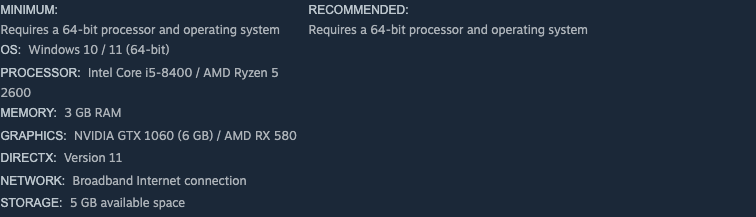
These are the base game’s published minimums. Optional speech and higher-quality voice systems have additional compatibility checks; meeting the minimum does not establish support for every Qwen3 feature. See platform limits before buying for Mac, Linux or a compatibility-layer setup.
Install, launch and join
- Open the official product in Steam. Check the current price and acquire the game on the account you intend to use.
- Install from your Steam Library. Let the download and available updates finish before launching.
- Complete first launch. Read the game’s EULA and privacy notice. Current official notes say hosting, joining and Steam invites wait until acceptance.
- Check speech. Choose the call language and microphone in Speech settings, then test captured text. Typed phone messages are available if recognition cannot run.
- Join friends on the same version. Apply updates on both the host and joining player’s machines. Use the multiplayer checklist if an invite fails.
Start with the first-shift guide once setup works. A speech, AI or voice-loading warning has its own diagnostic path in troubleshooting; record its exact wording before changing settings.
Is a free download available?
The checked Steam product is a paid Early Access game, not a free-to-play release. The official pages checked for this guide did not offer a separate demo or open playtest route. A lobby invite does not replace game ownership.
Use playtest and demo status for the scope of that check and price and access for the dated US price snapshot. Optional personal AI-service accounts have separate terms and costs.
CHECK THE ORIGINALS
Sources & version notes
Checked October 21, 2026. Official notes describe behavior at their publication date. Early Access updates may change it.